Hours and Location
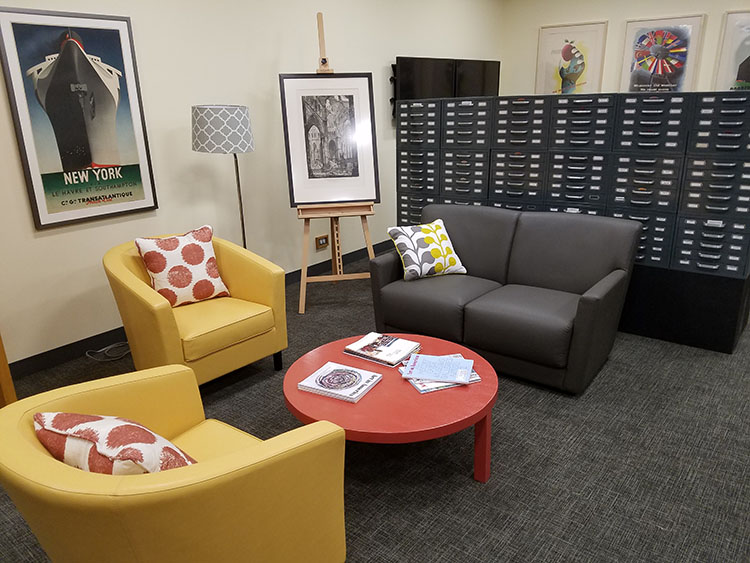 The Visual Resources Center (VRC) is open Monday-Friday, 8:30 am-4:30 pm. Faculty, students, and staff are welcome.
We are located in Lawrence Hall, below the Williams College Museum of Art (WCMA). At the bottom of the museum stairs, head away from the classrooms and towards the Art Department faculty offices. Pass through the light-filled lounge and our entrance will be on your left.
Staff
-
(413) 597-4786 · [email protected]
As the Director of Visual Resources, Amy directs the staff, services, facility, and long-term vision of the Visual Resources Center, which offers digital humanities teaching projects, digital and historic collections of art and visual culture images, training and workshop opportunities, and technology-rich collaborative spaces. She oversees, designs, and implements digital humanities teaching projects in collaboration with art faculty, providing expertise, support, and creative solutions for image-intensive teaching and learning. From JPEG files to glass lanterns, she curates collections of art and visual culture images that support the teaching and research of Williams faculty and students.
Before arriving at Williams in 2006, Amy was the Visual Resources Manager at Hillwood Estate, Museum & Gardens in Washington, D.C. She was responsible for the digitization, classification, preservation, and licensing of over 50,000 transparencies, slides, negatives, and prints of objects in the Museum’s collection of Russian and French decorative arts.
Amy received her Master’s degree in Art History from Southern Methodist University in Dallas, where she studied eighteenth-century French painting and American modernism, and worked as a Graduate Assistant at the Lady Tennyson d’Eyncourt Slide Library. She holds a Bachelor’s degree in Art History with a minor in Fine Arts from the University of Dayton in Ohio.
As an active member of the Visual Resources Association (VRA), Amy is a current Co-Chair of the Education Committee. She presented at the 2021 virtual annual conference. Her talk was entitled "Vital, Visible, yet Virtual: Pandemic Solutions for a Higher Ed Visual Resources Center." In 2020-2021, Amy held the position of New England Chapter Regional Chair. She served on the Executive Board as the Public Relations and Communications Officer in 2018-2020.
-
(413) 597-2395 · [email protected]
As the Digital Projects and Imaging Specialist, Joe designs and implements digital humanities teaching projects in collaboration with art faculty and manages digital imaging services, creating images, videos, and 3D models. He also provides technical support for image-intensive teaching and manages shared equipment in the VRC.
Joe has an MA in Art History with a concentration in Art Museum Studies from the City College of New York and a BFA in Art History and Film/Video Production from the Massachusetts College of Art and Design in Boston. He has recently focused on digital media production for the Worcester Art Museum and Fitchburg Art Museum.
-
As the Digital Projects and Metadata Specialist, Emily designs and implements digital humanities teaching projects in collaboration with art faculty. She also develops and enables access to digital and historic collections of art and visual culture images, specializing in the creation and management of descriptive metadata.
Before arriving at Williams, Emily was the Curatorial Research Associate at The Georgia O’Keeffe Museum in Santa Fe, New Mexico. She worked with a dynamic cross-disciplinary group of scholars to update the Georgia O’Keeffe catalogue raisonné and translate it to a digital format as a generative and collaborative form of humanities-based scholarship.
Emily’s research interests are modernism and the esoteric interests of late-19th and early-20th century artists, with a particular concentration on abstraction and the links between art, science, and religion. Emily received her MA in Digital Art History from Duke University, where her thesis utilized analog and digital methods to explore the social, spiritual, and theoretical implications of Swedish artist Hilma af Klint’s work. She holds a BA in Art History from the University of North Carolina at Greensboro.
Emily is an active member of the European Society for the Study of Western Esotericism (ESSWE), the Research Network for the Study of Esoteric Practices (RENSEP), Historians of German, Scandinavian, and Central European Art (HGSCEA), Digital Art History Society (DAHS), Alliance of Digital Humanities Organizations (ADHO), and the Visual Resources Association (VRA), where she serves as a member of the Cataloging and Metadata Standards Committee (CaMS).
Megamenu Social